
Logging in to HeyCunt casino gives access to the pokies lobby in real-money mode, the AUD cashier, the daily check-in tracker, the Promo tab and the VIP rewards. Sign-in is built around your mobile number rather than an email address, and works the same in a mobile browser and on desktop. This HeyCunt casino login guide covers how to sign in, recover a password, pass verification and fix the common access errors.
HeyCunt casinoAccount security runs on SSL encryption, with SMS tied to the registered mobile number and identity checks (KYC) requested before withdrawals. The name on the account must match your bank account name, which the site sets at registration.
| Login essentials | Details |
|---|---|
| Where to log in | heycuntaus.com - Login button on the lobby |
| Login credential | Mobile number or username + password |
| Password length | 6–20 characters |
| Verification at sign-up | SMS code to the registered mobile |
| Password reset | Forgot Password link on the login screen |
| Device support | Mobile browser and desktop - same layout |
| When KYC appears | Before a withdrawal is released |
| Currency | AUD |
| Support | Live Chat, Telegram, WhatsApp |
How to log in to HeyCunt casino
Signing in takes a few seconds once your account exists.
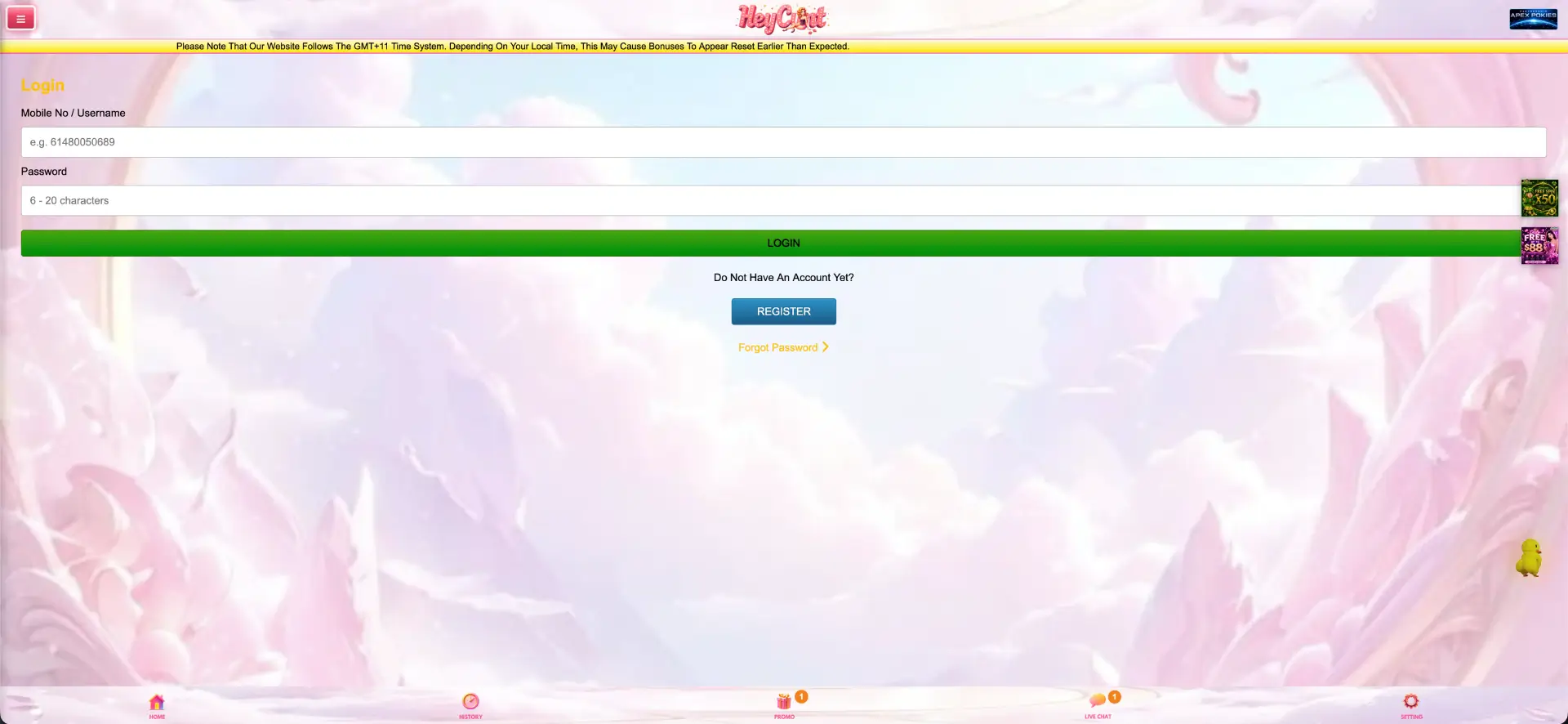
Step-by-step login
- Open heycuntaus.com in your browser.
- Tap the Login button on the lobby.
- Enter your mobile number (format 61XXXXXXXXX) or username.
- Type your password - the field is case-sensitive and 6–20 characters.
- Tap Login and wait for the lobby and balance panel to load without refreshing.
Create an account if you do not have one
If the login screen shows "Do Not Have An Account Yet?", registration is one tap away.
Quick registration flow
- Tap Register from the login screen.
- Enter your full name - it must match your bank account name.
- Add your Australian mobile number and a 6–20 character password.
- Enter a referrer code if you have one (optional).
- Press Get Code, enter the SMS verification code, then tap Register.
Secure login practices
- Use a password unique to HeyCunt casino, not one reused elsewhere.
- Keep the mobile number on the account current so SMS codes reach you.
- Log in only on your own device and avoid shared or public computers.
- Sign out after a session on any device that others can access.
Password recovery
If you cannot sign in, the login screen has a Forgot Password link.
Reset steps
- Tap Forgot Password on the login screen.
- Enter the mobile number registered to the account.
- Confirm the SMS code sent to that number.
- Set a new 6–20 character password.
- Return to the login screen and sign in with the new password.
Mobile login
Because HeyCunt casino runs in the browser, mobile login is identical to desktop - no app is needed.
Tips for mobile
- Add heycuntaus.com to your home screen for one-tap access to the login screen.
- Allow SMS to arrive before requesting a second code, to avoid duplicate messages.
- Use a stable connection so the balance panel loads on first sign-in.
Troubleshooting common login errors
Incorrect credentials
Check that the mobile number is entered in full with the 61 country code and no spaces, and that the password matches for case. If it still fails, use Forgot Password to reset.
Browser or cache issues
If the login page loads but the form does not respond or the session drops after submitting:
- Clear browser cache and cookies, then reload the page.
- Disable extensions that block scripts or third-party content.
- Try a different browser - Chrome and Safari both performed reliably in testing.
SMS code not arriving
Confirm the number on the account is correct and has signal, wait a short time before requesting another code, and check that message filtering is not blocking the sender.
Account blocked or restricted
If access is locked after repeated attempts or during verification, contact Live Chat, Telegram or WhatsApp to confirm your identity and restore the account.
What you access after login
- Real-money pokies play across the full catalogue.
- The AUD cashier - Deposit, Withdraw, Redeem and Refresh.
- The daily check-in tracker and points.
- The Promo tab with bonuses, rebates and free credits.
- VIP rewards, the share programme and the Lucky Draw.
- History and the live transaction feed.
Account verification (KYC)
Identity verification is typically requested before a withdrawal rather than at sign-up. Expect to confirm your identity and that the account name matches the bank account name used for payouts. Having documents ready before your first withdrawal keeps the AUD 30 minimum payout moving without delay.
FAQ about HeyCunt Casino Login
How do I log in to HeyCunt casino?
Open heycuntaus.com, tap Login, and enter your mobile number or username with your password.
Do I log in with an email address?
No. HeyCunt casino uses your mobile number (or username) and password, not an email address.
I forgot my password - what do I do?
Tap Forgot Password on the login screen, confirm the SMS code sent to your registered number and set a new password.
Why is my SMS verification code not arriving?
Check the number on the account, ensure it has signal, and wait before requesting another code; message filtering can also delay it.
When do I need to verify my identity?
KYC is usually requested before your first withdrawal, and the account name must match your bank account name.
Can I log in on mobile?
Yes. Login runs in any mobile browser with no app, and you can add a home-screen shortcut for quick access.